

A Calgary business recently discovered that several of its customers and vendors had received what looked like a routine invoice email from one of its staff. The sender address was real, the branding was real, and the message had been delivered cleanly through Microsoft 365. It wasn’t a spoof — the email came from a genuine internal mailbox that an attacker had quietly taken over. The first sign anything was wrong came from the people on the receiving end: customers calling to ask whether the email was legitimate.
We’re not naming the company. The point isn’t who it happened to. The point is that this kind of attack is common, it gets through email security that most businesses assume is doing its job, and the real cost shows up on the customer side rather than the breach side.
The Email Came From a Real Inbox
An attacker compromised an internal email account — most likely through a phishing email aimed at the employee who owned it, though credential reuse from a separately breached service is also common. With those credentials in hand, they signed in like the user would, and from inside the mailbox they sent a wave of emails to customers and vendors.
The messages didn’t try to fake anything. The sender address was real. The branding was the company’s own. The signature block was the employee’s. Every standard email check — SPF, DKIM, DMARC — passed without issue, because all of those are designed to confirm the message came from where it says it came from. In this case, it actually did.
The body of the email referenced a document or invoice and asked the recipient to click a link to view it. That was the trap.
How the Trap Worked
The link didn’t go straight to a malware payload. If it had, modern security tools would have flagged it. Instead, it walked the recipient through a sequence of steps designed to look harmless until the final one.
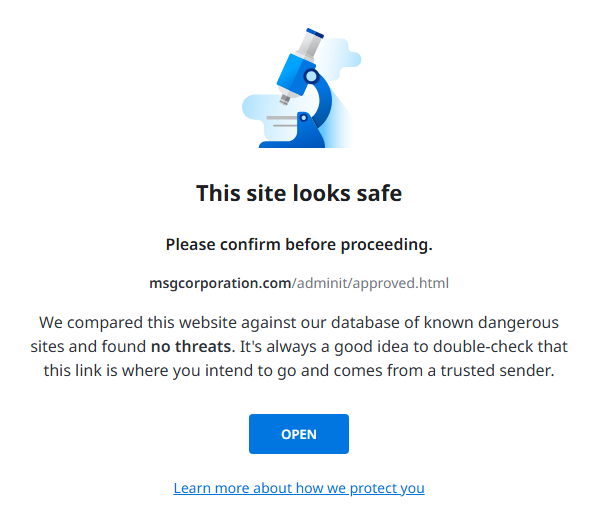
The first thing the link did was pass automated safety scans. Email providers check destination URLs against known threat databases, and at the time the message was sent, the domain wasn’t on any of them. It had been registered recently, hadn’t yet been reported by anyone, and didn’t host obviously malicious content. From the scanner’s perspective, it was a clean link.
That’s the part most people don’t realize: getting flagged “safe” by an email provider’s automated check doesn’t mean a link is safe. It means it hasn’t been reported yet. New phishing infrastructure is set up specifically to operate inside that window, before anyone has had time to flag it.
After the scan, the recipient saw a page asking for their email address. This step does two things — it confirms the visitor is using a real account and filters out the automated sandboxes that might otherwise analyze the page. From the user’s perspective, it just looks like the kind of email gate you’d see on a legitimate document portal. Then a human verification check appeared, the same one any number of legitimate sites use to keep bots out, which further reduced suspicion.
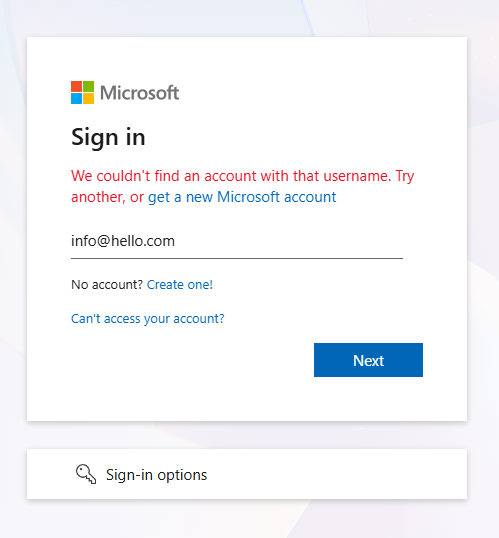
The final page presented what looked like a Microsoft sign-in screen. If a recipient had entered their actual email and password here, the credentials would have been captured and used to sign into their mailbox. From there, the same attack would start over — phishing emails sent to that person’s customers and vendors, from their real, authenticated account. We tested it with a fake address, which Microsoft couldn’t find, so the flow ended there. With a real address, the password prompt would have followed.
Why Most Email Security Misses This
Standard email security is built to inspect mail coming in. Its job is to stop external threats — phishing, malware, business email compromise attempts — before they reach an employee’s inbox. That’s where most attacks originate, and that’s where most filtering effort gets spent.
The blind spot is mail going out. Once a user has signed in to Microsoft 365 with valid credentials, the system treats their activity as legitimate. Outbound email isn’t subjected to the same scrutiny as inbound, because the assumption is that an authenticated user is a real user. Microsoft 365 isn’t broken — it’s doing what it was designed to do.
That assumption holds up exactly until an account gets compromised. Once an attacker has valid credentials, every email they send from inside the mailbox inherits the same trust as a real email from the real user. The platform doesn’t question it. The receiving servers don’t question it either, because all the authentication signals check out.
By the time anyone notices — which usually happens because a customer picks up the phone — the messages are already delivered and the damage is already done.
The Damage Isn’t the Email. It’s What Comes After.
The malicious email is just the delivery mechanism. The actual harm shows up downstream. If a customer enters their credentials into the fake sign-in page, the attacker now has access to that customer’s mailbox too. If they reuse passwords — and a meaningful percentage of people do — the attacker has access to other accounts as well. Contact lists get harvested. Internal documents get read. Wire instructions get changed. The original compromise is rarely the end of the chain. It’s almost always the start of one.
But even when no further accounts are compromised, even when every recipient ignored the email or recognized it as a phish, the reputational damage is already done. Customers received a malicious email from your company. They’ll remember that. The follow-up explanation lands in a fundamentally different way than the original message did. People remember being asked to be careful with email from your domain. They don’t remember the version of you that existed before that.
That’s the part of the cost that doesn’t show up on any incident report.
What Would Have Stopped It
The category of tooling that handles this gets called different things by different vendors — outbound mail filtering, API-based email security, integrated cloud email security. The naming matters less than what it actually does, which is inspect email leaving the mailbox the same way standard tools inspect email arriving in it.
When a legitimate user sends a normal business email, it looks one way: familiar tone, familiar recipients, familiar links to known domains, regular sending patterns. When a compromised mailbox starts sending, the pattern changes — sometimes subtly, sometimes dramatically. The recipient list expands suddenly. Links point to newly registered domains. The body uses phishing-style language the actual user has never used before. Document-share templates appear that don’t match anything the company has ever sent. A system watching for those signals can stop the message before it leaves the organization, quarantine it for review, and flag the account as likely compromised.
That changes the entire shape of the incident. Instead of finding out about the compromise through an embarrassed customer call, the IT team finds out through an alert. Instead of explaining what happened to recipients, they investigate while the bad email sits in quarantine. Instead of reacting, they contain.
The two outcomes are completely different. One leaves customers wondering whether they can still trust your email. The other leaves them never knowing the incident happened.
Small Businesses Aren’t Too Small to Be Targets
A common assumption is that this kind of attack targets enterprises with valuable data. It doesn’t. Attackers aren’t choosing based on company size — they’re choosing based on which mailboxes are easiest to break into. A small business with a single Microsoft 365 tenant and no outbound filtering is, from an attacker’s perspective, a working delivery channel to that company’s entire contact list. That’s the asset they’re after. Not the data inside the mailbox. The reach the mailbox provides.
A ten-person business with two hundred customers can damage two hundred relationships in an afternoon. The cleanup looks the same as it does at a larger company, just at a smaller scale, and small companies generally have less margin to absorb the trust hit.
Why We Treat This as Baseline
We require modern outbound email protection on every managed client we support. Not as a premium tier, not as an upsell, not as something we recommend after the first incident. It’s part of the standard package, because the alternative is leaving every client one phished password away from sending malware to their entire customer list.
The honest reason most IT companies don’t include it by default is that it’s easier to sell as an add-on after something bad happens. We don’t run that way. Outbound filtering is inexpensive to deploy, integrates cleanly with Microsoft 365 and Google Workspace, and prevents a category of incident that’s expensive in ways that don’t show up on a quote — the kind of damage measured in customer trust rather than dollars.
The best version of this incident is the one that doesn’t happen. The malicious email never goes out. The customers never see it. The apology email never gets written. That’s what this kind of protection actually buys: the absence of a story.