

Passkeys are starting to show up everywhere. Apple, Google, Microsoft, banks, and a growing list of websites all want you to switch. The prompts appear after logins, during updates, and in account settings. Most people hit “not now” or close the window without thinking twice. If you’ve been ignoring them, you’re not alone. A lot of people still aren’t sure what they actually are or why anyone should care.
What a Passkey Actually Is
The short version: a passkey is a replacement for your password. Instead of typing something you remember (or worse, something you reuse), your phone or computer proves it’s really you using a built-in secure chip and a quick check like your face, fingerprint, or device PIN. That’s it. No password to type, no password to forget, no password sitting in a database waiting to get stolen.
The Problem Passkeys Were Built to Fix
The problem passkeys were built to fix is simple and expensive. Passwords leak. All the time. A company gets breached, millions of email-and-password pairs end up for sale, and criminals try those same combinations on every other site they can think of. Phishing makes it worse. A convincing fake login page tricks people into handing over their credentials, and the attacker walks away with access. Even the best password managers can’t fully stop that, because the password still has to leave your device and travel to a server.
Passkeys cut that risk off at the source. The secret part never leaves your device. When you log in, your phone or laptop creates a unique cryptographic key pair that only works with the real website. A fake site can’t get anything useful out of the exchange. There’s nothing for an attacker to phish, nothing reusable across sites, and nothing sitting in a company’s database that becomes worthless the moment it’s stolen.
You still need to unlock your device the usual way (face, fingerprint, or PIN), so it’s not magic. But once that’s done, the passkey handles the rest without you ever seeing or typing a password again. Most people notice the biggest change is speed. Unlocking with your face and being in is faster than typing, even if you had the password memorized.
The Catch with Synced Passkeys
There’s a catch with the convenient version most people encounter first. The passkeys that sync across your phone, laptop, and tablet usually live inside your Apple, Google, or Microsoft account. That account itself is still protected by a username and password (or something close to it). If someone gets into the account that does the syncing, they can often reach the passkeys too. The whole chain still depends on the very thing passkeys were supposed to replace.
Portability is another quiet problem. If you use a Windows laptop and a work phone, the default path is for Windows to store the passkey on that machine. Moving it cleanly to another device or platform is awkward or impossible without jumping through extra steps. The passkey stays stuck where it was created.
Why We Prefer Hardware Keys
This is why we prefer physical passkeys. These are small hardware devices often the size of a USB stick or a key fob that hold the credentials themselves. You plug one in or tap it, unlock it with a PIN or touch, and it works on any computer or phone that supports the standard. No cloud account sits in the middle. No sync service to compromise. You can carry the same key between your laptop, your phone, a work machine, or a borrowed computer and it just works. If the device is lost, you revoke it and move on. The secret never lived in someone else’s server.
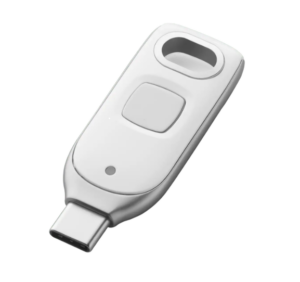
They’re not as frictionless as the ones that live in your phone’s secure enclave, but the trade-off is real independence. For accounts that matter (email, banking, work systems, anything you can’t afford to lose control of), the hardware version removes the last weak link that synced passkeys still carry.
Getting Started
Some sites make creating either kind almost automatic. Others still treat it as an optional extra. Support is growing fast enough that it’s worth setting them up on the accounts that matter most. Your devices already know how to talk to both the software and the hardware versions. The websites are the ones catching up.
If you’ve been putting it off because it sounded complicated, it isn’t. The next time a site offers to create a passkey, say yes. And if the account is important, reach for the physical one.